
Most of the grad students I supervise now keep a Claude tab open more or less permanently. The funny thing is, when I ask what they use it for, I get wildly different answers: one reads papers with it, another debugs the R script that just won't run, a third uses it specifically to translate a reviewer's snide remarks into plain language so they can answer point by point. I'm no different. At first I was skeptical—"AI for research" just sounded unserious to me. After more than a year, I'm halfway converted: it really has taken over a large chunk of my work, but the part it took over isn't "the research"—it's the time-consuming, brain-dead chores around the research.
These are my field notes. Where it genuinely helps, where it nearly burned me, how it stacks up against ChatGPT and Gemini, how it divides labor with specialized tools like Elicit—I'll try to be concrete and skip the fluff. Here's the conclusion up front: treat it like a colleague who reads blazingly fast, responds instantly, but occasionally bullshits you with a perfectly straight face. Keep an eye on it, and it'll save you a good chunk of your life.
First, let's be clear: what exactly is Claude Opus
Claude is Anthropic's family of large models, and Opus is the heaviest hitter in the lineup—the current latest is Claude Opus 4.81. It is not a purpose-built "academic engine"—no built-in paper database, and no internet access by default. So don't expect it to dig up last week's preprint for you.
 Figure 1. Claude is Anthropic's family of large models, and Opus is the strongest tier. Logo source: Wikimedia Commons (CC).
So where's its strength? In three utterly unglamorous things: it reads a lot, thinks carefully, and writes clearly. Sounds unremarkable—but think back over your own week. Isn't a sizable chunk of it just reading, thinking, and writing? That's exactly the slot it fills.
The number that actually changed how I use it: 1 million tokens
If I had to pick the one spec worth remembering, it's the context window: Claude Opus 4.8 can take in roughly 1 million tokens at once, somewhere north of a thousand pages of text1.
Why this number matters is best shown with an example. In the early days of these tools, the most common crash was that you'd paste only the "Results" section, it couldn't see the methods, and it'd pass judgment on a table blindly. Not anymore: you can throw in a paper together with its appendix, a grant proposal together with the original guidelines, an entire analysis script together with its data dictionary—all at once—and then ask the kind of question that only makes sense once you've read the whole thing.
And it's not just "it fits." My own experience lines up with third-party benchmarks here—this tier of Claude genuinely puts the whole window to use. Drop in a hundred-odd pages and ask about some detail on page eighty, and it can dig it back out; some models start "losing the thread" once you go past a hundred thousand tokens2. So my habit now is crude and simple: if I can give it the whole thing, I never slice it up.
What it has actually taken over in my work
I'll get a bit more detailed here, because "what can it do" is useless as raw capability—it has to come down to what you can get done with a few keystrokes. Let me lay out the mapping in a table first, then expand on each item in the sections that follow.
| The task on my desk | Why it can handle it |
|---|---|
| Reading papers and probing further | 1M tokens fits the full text + figures + appendix; it can quote, cross-reference, not just summarize |
| Interpreting my own results | Step-by-step reasoning is fine-grained, and you can tune the depth with the effort dial |
| Reading figures and photographed tables | It has vision; feed it screenshots or photos directly1 |
| Writing and cleaning up code | Coding and multi-step tasks are first-tier1 |
| Drafting and polishing | Clear prose, stable structure—abstracts, cover letters, reviewer responses |
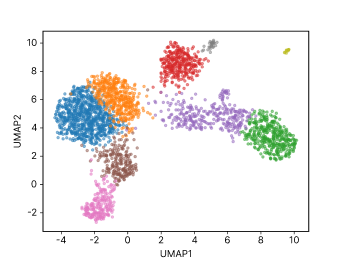 Figure 2. A lot of what you read and produce in research every day is exactly this kind of figure—a single-cell transcriptomics UMAP, say. Screenshot one and hand it over, and the model can give you a rough read.
Reading papers: get the lay of a paper in twenty minutes
I paste in the full text, then ask in this order: What's the core claim? Which pieces of evidence support it? Where's the weakest link? Then one more line—"To convince me of the conclusion in the title, what three results, at minimum, would I need to see?" Once it's done listing, I read the paper properly. The difference is that this time I'm reading with a sense of where to look, and the efficiency is a whole different story.
Interpreting results: make it spar with you, not cheer for you
After running a batch of data, I give it the design and the results, then one blunt order: take the opposite side, poke holes. What's the most likely confounder, where would a nasty reviewer bite first. It's far more useful as a sparring partner than as a cheerleader—and you can simply demand that it spar, and it'll dutifully start swinging.
Writing code: make it spit out its assumptions first
This is the part I use most and worry about least. A single line—"here are the columns of my CSV and what each one means; write a script to do X, and print out all the assumptions you're making"—basically saves me half an hour. The key is that last clause: just glancing at the printed assumptions lets you catch most of the silent failure modes. For writing code and running these multi-step tasks, it really is first-tier1.
Revising manuscripts: hand it the scaffold, keep the judgment
Abstracts, cover letters, reviewer responses—formulaic but maddeningly tedious bits of text—are the most worthwhile things to hand over for a first scaffold. Note: a "scaffold," not a final draft. This goes double for reviewer responses: give it the comments and the manuscript together, ask for a point-by-point outline, and the substance is still yours to fill in.
Where it'll trip you up
For all its usefulness, you need to keep its limits in mind. The points below aren't "occasional"—they're structural. Step on them and you've stepped on them.
| Weakness | What's actually going on | What it means for you |
|---|---|---|
| It fabricates references | It generates by "plausibility"—the formatting is perfect, the content may simply not exist | Any citation: don't use it without checking the DOI |
| No internet by default | Unless a tool gives it retrieval, it may be out of date on very recent work | You handle the search for anything time-sensitive |
| It's not a statistician | Ask it to run a test it shouldn't, and it'll run it anyway | The choice of statistics is still your call |
| It gets lazy with long material | With very long input, it sometimes skips details or over-summarizes | Always check key conclusions against the original |
I have to say more about the first one, because it does the most damage. The citations it invents have author, year, journal, volume/issue/page—all looking the part; without clicking through, you genuinely can't tell they're fake. This isn't just my private gripe: a 2026 study specifically documented a sharp rise in AI-fabricated citations in published papers3; another large-scale analysis of over fifty thousand top-conference papers and more than two million citations found that roughly 1.07% of papers harbor invalid or fabricated citations—and that figure jumped more than 80% in 2025 alone4.
The good news is that the more specific your prompt and the more familiar your field, the lower the odds it fabricates5. The bad news is that "lower" isn't "zero"—multiple reviews list these "looks proper, doesn't exist" citations as a real, current threat to research integrity6 7. So the verification step is one you can never skip8.
No internet by default; it goes stale on very recent work
Its knowledge has a cutoff, and for anything after that cutoff it either doesn't know or just guesses. I once asked it about the "latest progress" on a certain method; it spoke very fluently, and when I checked, everything it cited was from a review two years old. Unless the product you're using has explicitly equipped it with internet or retrieval tools, don't treat it as a literature database. To get full coverage of the literature on a topic, just go ahead and pair it with a tool that has a real index, like Elicit or SciSpace9 10.
It's not a statistician; ask and it runs
This one is the most insidious, because it won't refuse. Hand it a dataset that shouldn't get a parametric test, and it'll very obligingly run a t-test for you, complete with an explanation that looks thoroughly professional. What it lacks isn't compute—it's the judgment of "should this test even be run." So the choice of statistical method is ultimately still yours to make; at most it can turn the method you've chosen into code.
When material gets long, it quietly "slacks off"
When the input is very long—say you've dropped in a hundred-plus pages at once—it occasionally skips some details, or over-summarizes a passage into a single sentence. Broadly right, but for the handful of key points you're going to draw conclusions from, always check them back against the original. My habit is: an overview is fine, but any specific number or conclusion headed into the manuscript, I flip back to the location it cited and verify with my own eyes.
Claude, ChatGPT, or Gemini: my honest take
I rotate through all three day to day. Here are some subjective but real impressions (treat benchmark scores as a rough guide—in the end you have to test on your own work).
 Figure 3. The three general-purpose models most often compared in research. Logo source: Wikimedia Commons (CC).
| Model | What I reach for it to do | What to watch for |
|---|---|---|
| Claude Opus | Chewing through long material, writing code, running multi-step pipelines, long-form writing; reliable at tool calling in practice2 | No built-in literature database; fabricates citations |
| ChatGPT | General everyday use, broad plugin ecosystem, easy onboarding | Per benchmarks, more prone to "losing the thread" at very long context (>100K tokens)2 |
| Gemini | Often leads on pure-reasoning benchmarks; tightly tied to Google Search/the Google suite2 | Ultimately a general-purpose assistant, not built for research |
A bit of a buzzkill, though—in my daily work, that gap often gets erased by "do you know how to ask." Giving it the full material and forcing the assumptions out matters far more than agonizing over which vendor to pick. Here's specifically when I open which.
When I open Claude
For chewing through long material, writing code, and running multi-step work, it's my default. A paper plus its appendix, a script to fix plus its data dictionary—throw it in and probe to the end, and it doesn't lose the thread much; ask it to write scripts or rework a pipeline, and the rework rate is low too2. When I need it to dutifully spar and poke holes, it plays along.
When I open Gemini
When I want it to quickly search for something and then fold the findings into the answer, or when I'm already working inside Google's docs/email suite, Gemini is the smoother fit; it also posts strong scores on some pure-reasoning benchmarks2 11. But it's ultimately a general-purpose assistant, and when I need a real "research buddy" for a deep conversation, I go back to Claude.
When I open ChatGPT
When I want the easy path—the broadest plugin and app ecosystem, or when everyone else on the team is on it and I need to align—I open ChatGPT. It's general-purpose and easy to pick up. It's just that for the kind of ultra-long material where you dump in a hundred-plus thousand tokens at once, benchmarks say it's more prone to losing the thread than the other two2, so I don't hand that kind of work to it.
A real example: from "is this trend real?" to a submission-ready figure
Here's a scenario I hit all the time. You've run a small dose-response experiment, you've got just a handful of points, and before you sink more time into it you want to size it up: is this trend real, or am I seeing things?
This task actually splits in two. The first half is "thinking it through," and that suits the model perfectly. Throw it the data and the question: does the monotonic trend hold, what test is appropriate, what to watch for with such a small sample, whether to look at effect size before talking significance. It'll lay out the reasoning step by step, and your job is to flag the parts that don't hold up.
The second half is "producing the deliverable," and this is where the conversational model should bow out. It can write the plotting code, but it can't see what the rendered figure looks like, can't judge whether the layout is clean, and certainly can't hand you a vector figure you can drop straight into the manuscript and keep editing. That last mile I usually hand to a dedicated figure tool—I use MindPlot myself: upload the data, say what you want plotted, and it produces an editable figure, sparing you another fight with matplotlib's fonts and margins.
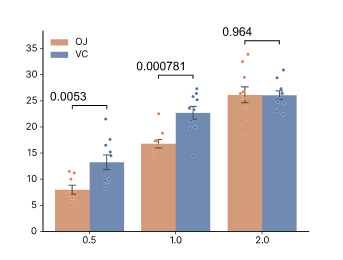 Figure 4. A grouped figure like this, with statistical tests and significance annotations, comes out from uploading the data and saying one line—and you can keep editing it on the canvas.
The division of labor in one sentence: the model does the thinking about the data, the tool delivers the finished product. Don't make one tool muscle through both jobs.
Beyond general-purpose models, there's a whole class of specialized tools
General-purpose large models alone aren't enough. For genuinely exhaustive coverage of the literature, specialized tools are often more reliable, because behind them is a real paper index rather than the model's imagination.
- Elicit is good at structured screening and information extraction over a real paper library—especially handy for systematic reviews and meta-analyses; but it's narrow, and basically doesn't do general reasoning or writing9.
- SciSpace covers more ground, letting you discover, read, explain, and find related work across a vast body of papers, carrying you from "discovery" all the way to "first draft"; but it leans toward reading and discovery, and isn't the tool you'd reach for to do general analysis9 12.
Putting general models and specialized tools side by side, the division of labor looks roughly like this:
| Tool | What I reach for it to do | Its real limitation |
|---|---|---|
| Claude Opus | Deep reasoning, chewing through long material, writing code, writing | No built-in literature database; fabricates citations |
| Elicit | Structured screening and extraction over a real index; systematic reviews/meta-analyses | Narrow; doesn't do general reasoning or writing9 |
| SciSpace | Discover, read, explain, and find related work across a vast body of papers | Leans toward reading and discovery, not a general analysis tool12 |
| MindPlot | Turning analysis into finished products—figures, slides, documents | It's the output layer, not a frontier conversational model itself |
The combination I've landed on is this: use a frontier model to think and write, use a tool with a real index like Elicit / SciSpace when you need full literature coverage10, and use a production tool like MindPlot to make the "finished products"—the figures, slides, papers. The three kinds are complementary; don't force one to do another's job.
Student, postdoc, PI: one tool, three ways to use it
The same Claude gets used quite differently by people at different career stages. Here are a few I've actually seen up close.
If you're a grad student
The most cost-effective use I've seen is to lower the "stuck cost." Can't make sense of a code error—paste the whole block in and have it explain, plus give a minimal reproducible fix. Your English won't flow—have it smooth out the language without changing your meaning (note: smooth the language, not write it for you). A classic paper you can't get through—have it give you a plain-language version first, so you have your bearings before tackling the original. In a word: wherever you're stuck, ask it first; it often saves you half a day.
If you're a postdoc
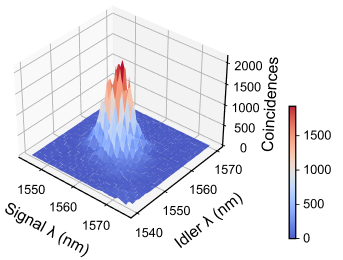 Figure 5. When the data has a complex shape (like this 3D surface), drawing the figure by hand is a real chore—hand the reasoning to the model and the figure-making to a tool, and this kind of work gets a lot lighter.
A postdoc's time is the most fragmented, and it fills exactly these scattered chores. Running data—have it write the script and print the assumptions along the way; before submission—have it play reviewer and rehearse, patching the points most likely to get bitten; mentoring students—have it organize the methodology you've got in your head, spoken aloud, into a document you can send them. It won't do the research for you, but it lets you make a few more laps in the same amount of time.
If you're a PI
At the PI level, the bottleneck is often "can't keep up with the reading." A manuscript from the lab, cross-disciplinary literature, an idea you haven't fully thought through—drop the whole thing in and have it give you a structured overview and a few points worth probing, then you decide where to dig in. What it does for you is "skim it first, mark the key points," and what it saves is your most expensive bit of attention.
A few prompts I use every day
Talking about method in the abstract is too airy, so here are the few templates I've pasted countless times—tweak them and they're ready to go. None of them are fancy; the point is to spell out the "context" and "what I actually want."
Reading a paper
Here's the full text of a paper (including the appendix). Answer in order: ① What's its core claim; ② which pieces of evidence support that claim, and in which section each one is; ③ where you think the weakest link is. Then list: to convince me of the conclusion in the title, what three results, at minimum, would I need to see?
Interpreting a set of results
I ran [one-line experimental design] and got this data: [paste data]. I want to know [your question]. Reason step by step: does this comparison hold, what statistical method is appropriate, and what to watch for with such a small sample. Don't rush to a conclusion first—lay out your reasoning and assumptions.
Making it spar and poke holes
Below is my study design [paste design]. Take the stance of a picky reviewer and tell me: what's the most likely confounder, where the methods are easiest to attack, and—if you were going to reject this—which three comments you'd write. Don't comfort me; go ahead and pick it apart.
Writing a script and surfacing the assumptions
Here are the columns of my CSV and what each one means: [paste column descriptions]. Write a [language] script to do [task], and at runtime print out all the assumptions you're making about the data (e.g., which column you treat as numeric by default, how you handle missing values). I want to see the assumptions before the results.
You can probably spot the common thread in these: give full context, state clearly what you want, and force it to surface its assumptions and reasoning. Building this habit beats switching models by a wide margin.
How much it costs and how to start
Claude Opus comes in several flavors—pick by your needs:
| Way to use it | Who it suits | Rough cost |
|---|---|---|
| claude.ai web/subscription | Individual everyday reading, writing, interpreting results | Has a free allowance; go paid subscription for heavy use |
| API (pay-as-you-go) | Wiring it into your own scripts/pipeline | Opus 4.8 is roughly $5 / million input tokens, $25 / million output tokens1 |
| Claude Code (command line) | Writing code, running data analysis, automation | Tracks with your subscription or API usage |
My advice is don't fixate on the API right out of the gate: use the web version on your own work for a couple of weeks first, confirm it genuinely helps, then talk about wiring it in. Put the time it saves you next to the money it costs, and whether it's worth it is usually obvious at a glance.
A few words for beginners
- Check every citation and every number yourself. Treat its output as a draft, not a conclusion3 6.
- Give it the whole thing rather than fragments—that 1-million-token window is exactly what it's for.
- Force it to state its assumptions, in code and in reasoning alike; this one habit catches the bulk of errors.
- Make prompts as specific as possible: spell out the field, the goal, the constraints, and it'll drift and fabricate far less5.
- The judgment part of research is always your job. What it's fast at is the mechanical layer; don't outsource the judgment.
Three pits I've fallen into
You can preach principles all day, but it's better to tell a few stories about times I genuinely fell on my face. I hope you don't repeat them.
Pit one: I nearly put a fabricated citation into the intro
Once, writing the introduction, it smoothed out a paragraph of background for me with three citations attached—nice formatting, plausible years and authors. I was in a rush and nearly copied them straight in. Then, out of habit, I clicked a DOI—the second one simply didn't exist. The title, authors, and journal of that "paper" were all stitched together by the model. From then on I set an iron rule: every single citation it gives me, no entry into the manuscript until I've clicked through and verified it against the original. This isn't something only I run into—in research this kind of fabricated citation is clearly on the rise3 4.
Pit two: it turned "correlation" into "causation"
When I had it interpret a set of observational data, it wrote so fluently that it quietly narrated an obviously merely correlational relationship as "A causes B." It's not deliberately deceiving you—it's that "because… therefore…" reads more smoothly in prose, so that's how it wrote it. Had I not been on guard, that framing might well have ridden into the discussion section. Now, when I have it interpret results, I specifically tack on: "Can you draw a causal conclusion here, or is this just correlation?"
Pit three: in ultra-long input, it missed a key limitation in the appendix
Once I dropped a whole paper with a long appendix into it and asked it to summarize the methods and limitations. It summarized them well, but missed an important limitation the authors had spelled out in the appendix—and that very limitation determined whether the method could be applied to my data. The longer the material, the more easily it "summarizes away" certain details. So for any key point I'm going to base a decision on, I go back to the original and confirm it again.
FAQ
Q: Can it write my paper for me? It can help you draft, rewrite, and polish, but the substance has to be yours. The safer use is to have it produce a scaffold and draft, then you fill in the judgment and conclusions, and verify every fact and citation3.
Q: Does it really fabricate references? It really does, and it's the norm, not the exception. Studies show fabricated citations clearly rising in published papers3 4. So for any citation, click through and verify the DOI before using it.
Q: Can it search the internet for the latest literature? Not by default. Unless the product you're using has equipped it with retrieval/internet tools, it may be out of date on very recent work. To get full literature coverage, it's safer to pair it with a tool that has a real index, like Elicit or SciSpace9 10.
Q: For research, should I pick Claude, ChatGPT, or Gemini? To reliably handle long material, write code, and run multi-step pipelines, I mostly pick Claude; for pure-reasoning benchmark scores and the Google ecosystem, Gemini has the edge; for the broadest general ecosystem and the fastest onboarding, ChatGPT is the convenient choice2 11. In daily work, "how you ask" often decides the result more than "which vendor."
Q: Can it directly produce the figure I'll submit? The model can write plotting code, but it can't see the rendered result and can't hand you an editable vector figure. Hand the reasoning to the model and the figure-making to a production tool like MindPlot—that's the smoother division of labor.
Final thoughts
After more than a year, my summary really comes down to a few lines. Claude Opus's real value is that it reads a lot, thinks carefully, and writes clearly, plus that ultra-long context that lets you stuff in the complete material in one go1. Its two biggest pits are fabricating citations and no internet by default—for the former, check the DOI; for the latter, pair it with a dedicated retrieval tool3 9. Different jobs call for different gear: the model thinks and writes, a real index gives you full literature coverage, and a production tool delivers the finished product. As for the part of research that genuinely needs judgment, to this day, that's still on you—and I think that's a good thing.
The tool behind that figure. To turn an analysis into a publication-grade, editable figure without writing plotting code yourself, I use MindPlot's AI co-scientist. It's the "production layer" that complements reasoning models like Claude Opus: you and the model think the problem through, then—without getting tripped up on the last mile—you produce the figure, slides, or first draft.
Dan Feng writes about research workflows for MindPlot, perpetually wrestling with one question: where does AI genuinely help, and where is it just putting on a show.
References
-
Anthropic, "Models overview" (Claude Opus 4.8 context window, vision, pricing, and specs). https://platform.claude.com/docs/en/about-claude/models/overview
-
BenchLM, "ChatGPT vs Claude vs Gemini in 2026: The Definitive Comparison". https://benchlm.ai/blog/posts/chatgpt-vs-claude-vs-gemini-2026
-
STAT, "Lancet study finds steep rise in fraudulent AI citations in academic papers" (2026). https://www.statnews.com/2026/05/07/lancet-study-finds-steep-rise-fraudulent-citations-academic-papers/
-
"GhostCite: A Large-Scale Analysis of Citation Validity in the Age of Large Language Models" (arXiv, 2026). https://arxiv.org/pdf/2602.06718
-
"Influence of Topic Familiarity and Prompt Specificity on Citation Fabrication ..." (PMC). https://pmc.ncbi.nlm.nih.gov/articles/PMC12658395/
-
"Citation Accuracy Challenges Posed by Large Language Models" (PMC). https://www.ncbi.nlm.nih.gov/pmc/articles/PMC12037895/
-
"Hallucinated citations produced by generative AI may constitute research misconduct ..." (Taylor & Francis). https://www.tandfonline.com/doi/full/10.1080/08989621.2026.2645390
-
"Do Language Models Know When They're Hallucinating References?" (arXiv). https://arxiv.org/pdf/2305.18248
-
Paperguide, "Elicit vs. SciSpace: Comparing AI Research Tools (2026)". https://paperguide.ai/blog/elicit-vs-scispace/
-
Listen Labs, "AI Research Assistant for Literature Review: Top Tools 2026". https://listenlabs.ai/articles/ai-research-assistant-literature-review/
-
Kay Rottmann, "ChatGPT vs. Claude vs. Gemini in 2026: Which model for which job?". https://www.kay-rottmann.de/en/blog/chatgpt-vs-claude-vs-gemini-2026/
-
Cybernews, "SciSpace Literature Review 2026". https://cybernews.com/ai-tools/scispace-literature-review/